How 30-second appliance and solar data — integrated natively with Home Assistant — enables real-world energy automation for solar households and home automation enthusiasts.
Executive Summary
Australia’s smart home market is growing rapidly, with the sector projected to expand from $4 billion in 2025 to over $11 billion by 2034. Key drivers include rising energy costs, widespread solar adoption, and the growing maturity of open home automation platforms. At the centre of this shift is a common problem: most home automation systems know how to control devices, but they lack the granular, real-time energy visibility needed to control them intelligently.
Powersensor is a fully DIY, self-installed energy monitor with a retail price from $200 AUD that captures data every 30 seconds at the site level, including gross solar generation and individual appliance sub-circuits. It is the behind-the-meter data layer that home automation systems need to make energy decisions that are actually grounded in what is happening in the home right now.
This white paper is written for two audiences who share this problem:
- Solar and battery households — who want to maximise self-consumption, minimise grid import, and reduce tariff costs, but whose current setup cannot see what is happening at the appliance level behind the meter.
- Home automation enthusiasts — who run platforms such as Home Assistant and want a high-quality, officially-supported energy data source to feed automations that go beyond what a smart meter or inverter API alone can provide.
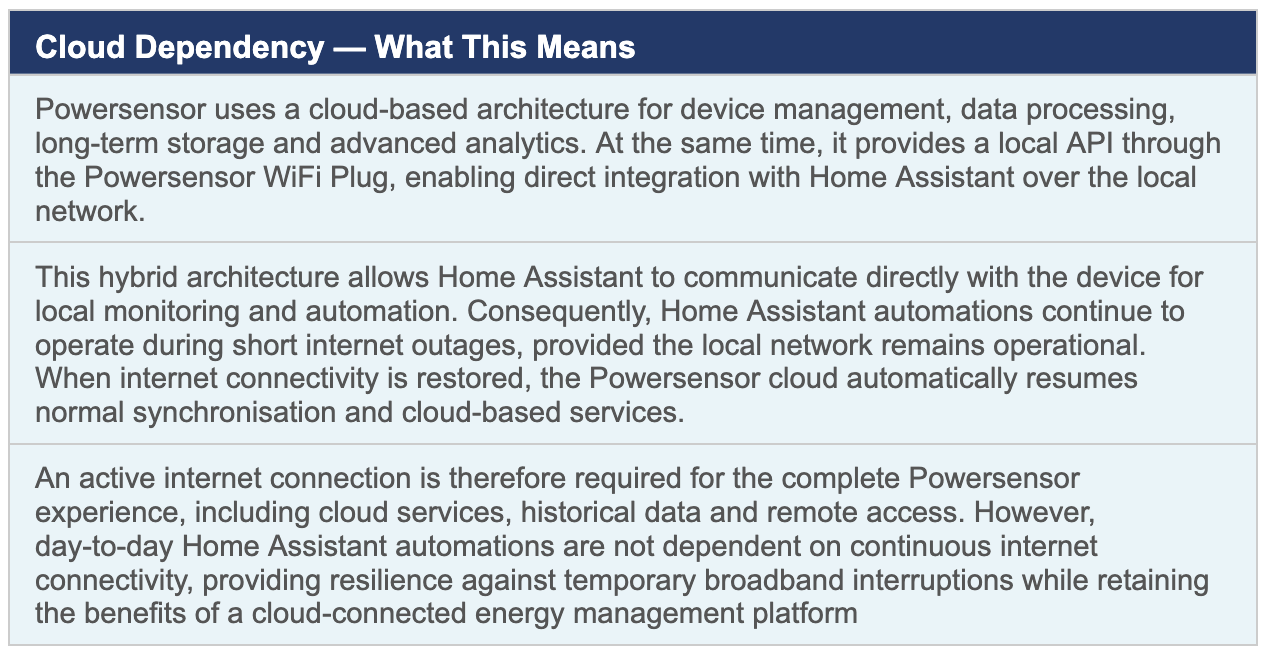
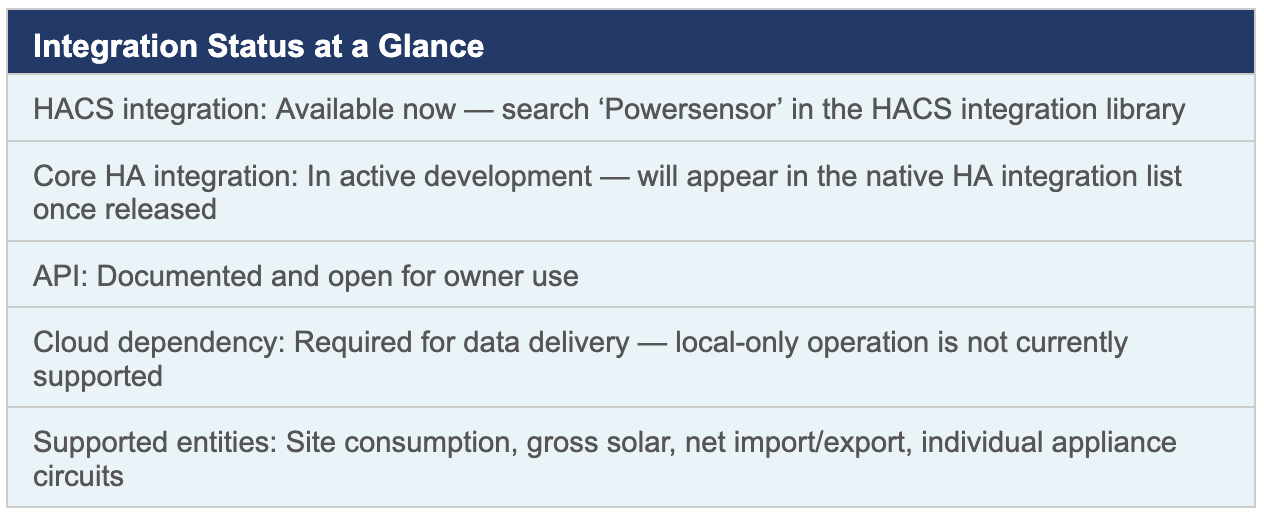
Powersensor currently offers an official Home Assistant Community Store (HACS) integration, with a native Home Assistant core integration in development. Data is delivered via a documented API and requires a cloud connection, enabling integration into automations, dashboards, and energy management workflows.
This white paper explains the data Powersensor provides, why that data matters for home energy management, and five real-world Home Assistant automation scenarios that demonstrate what becomes possible when appliance-level energy visibility is available in real time.
1. The Home Energy Visibility Problem
1.1 What Most Systems Can and Cannot See
The average Australian solar household in 2026 has more connected energy hardware than ever: a rooftop solar system, often a battery, increasingly an EV charger, and a growing range of smart appliances. Most of these systems have their own app, their own cloud, and their own data silo. The home automation platform that is supposed to tie them together is left working with incomplete information.
The typical data sources available to a Home Assistant installation illustrate the gap:
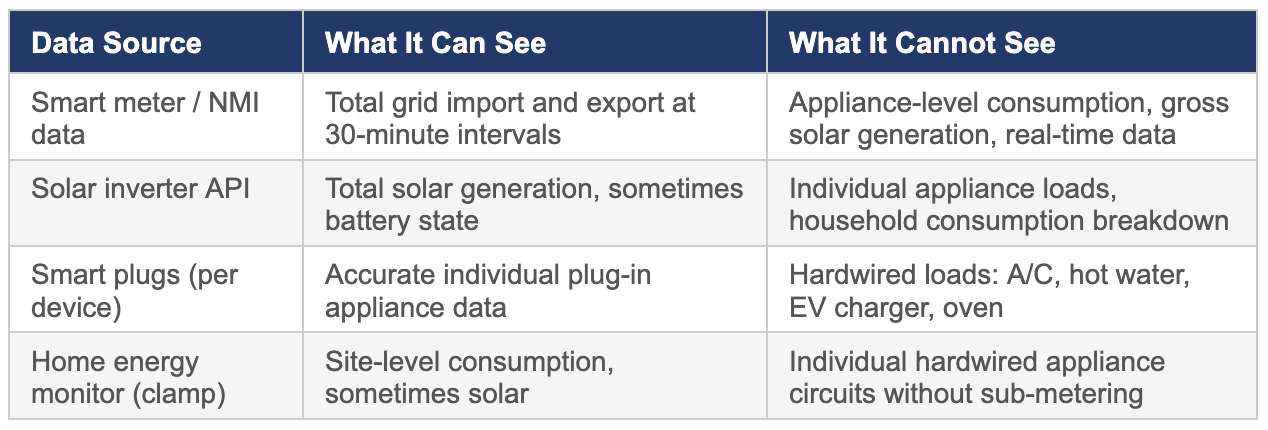
The result is a common frustration: a home automation platform that can theoretically control every device in the home, but cannot make intelligent energy decisions. Without knowing which load is responsible for energy consumption at any given moment, or having visibility at 30-second resolution, automation can only go so far.
1.2 Why 30-Second Resolution Matters for Automation
Home automation decisions happen in near real-time. An automation that decides whether to divert surplus solar to a hot water system, or whether to pause an EV charge, needs to know what is happening now — not what happened on average over the last 30 minutes. At 30-second intervals, Powersensor captures the events that matter:
- A solar generation spike as cloud cover clears, triggering a surplus diversion automation before the moment passes
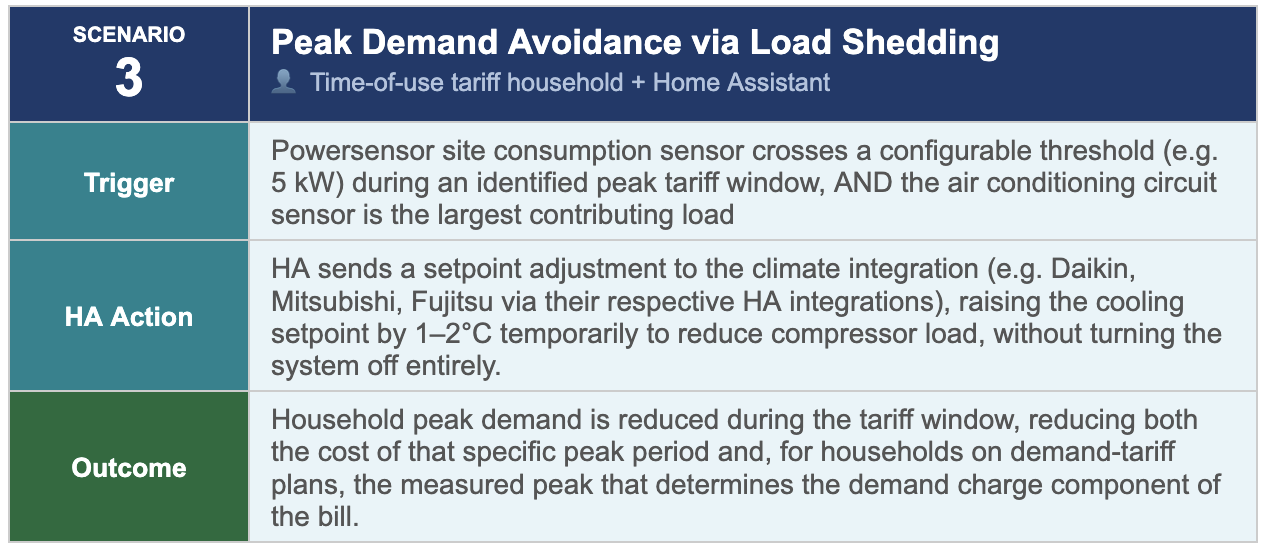
- An air conditioning compressor starting up, allowing a load-shedding automation to respond before the peak demand period deepens
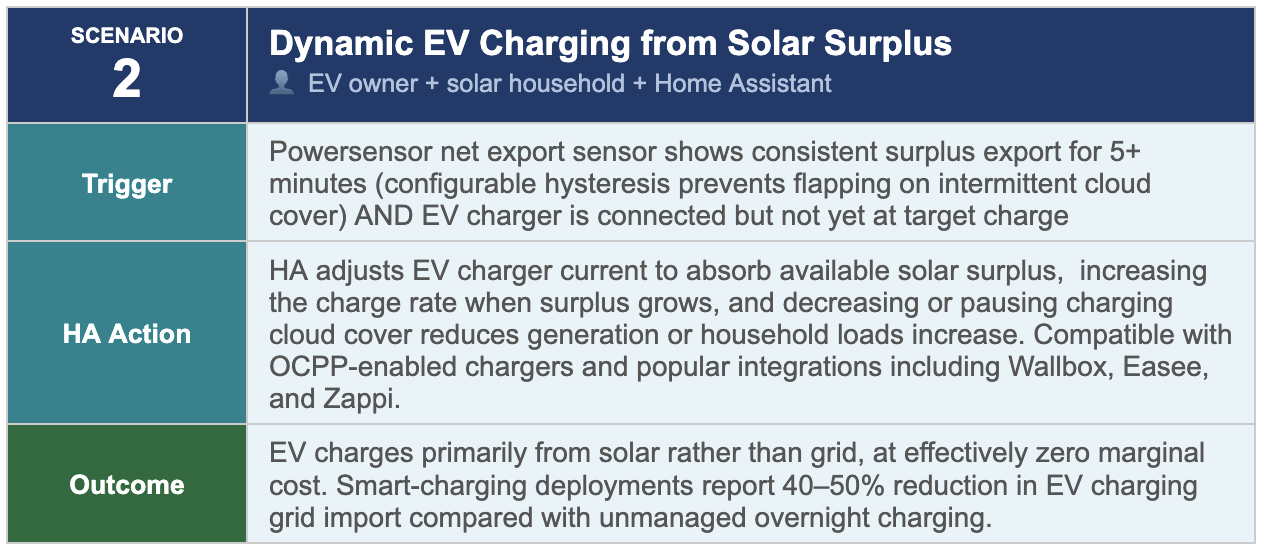
- An EV charge session beginning, enabling the automation to assess whether current solar generation justifies the added load or whether to pause and wait
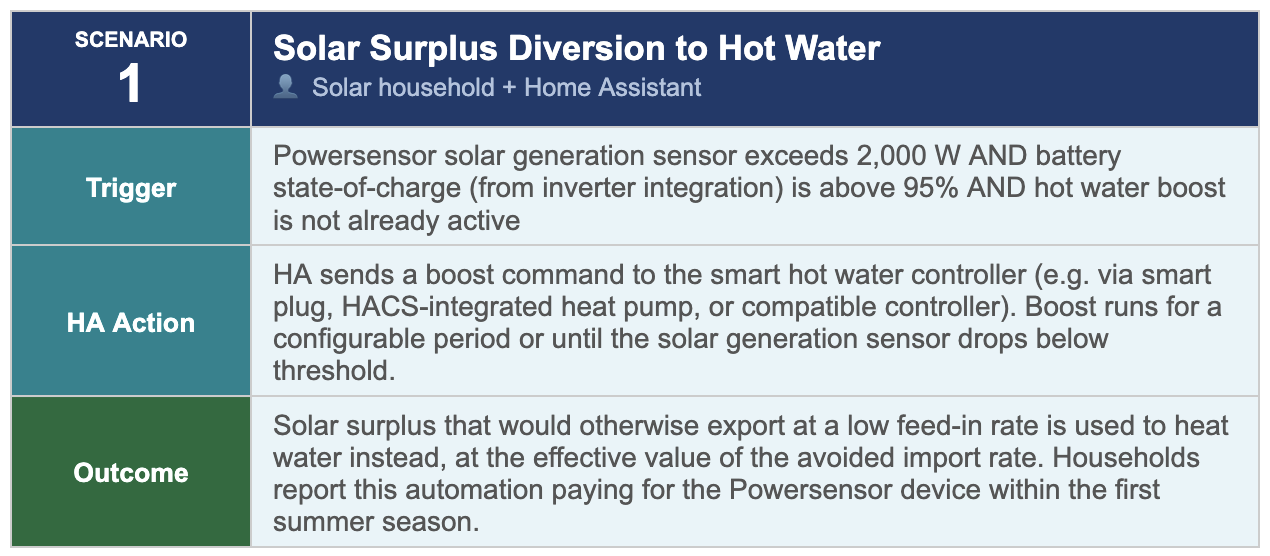
- A battery reaching its target state of charge, triggering a hot water boost from surplus generation rather than exporting at a low feed-in rate
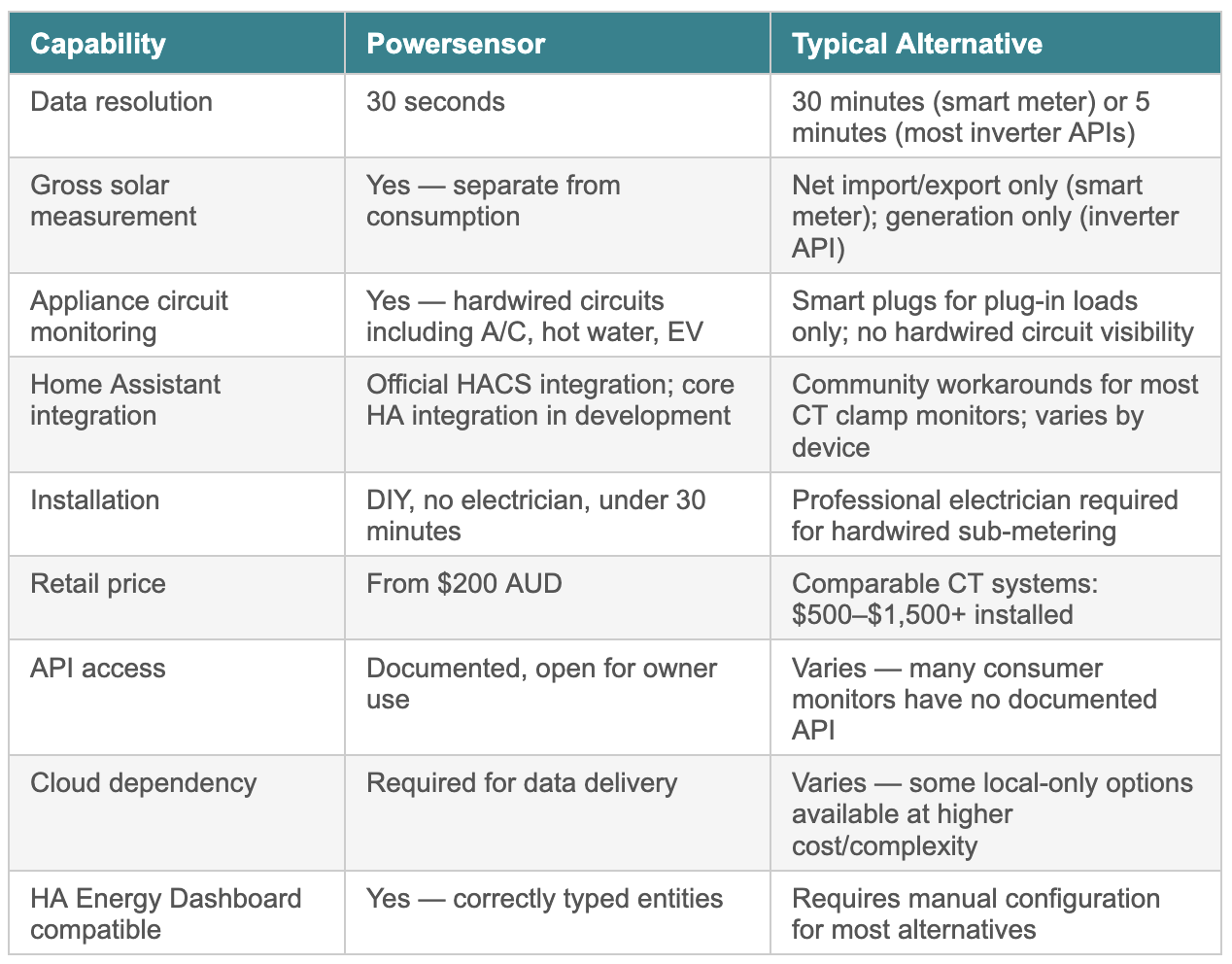
A 30-minute smart meter interval would see none of these events in time to act on them. Most inverter APIs refresh at best every 5 minutes. Powersensor’s 30-second data closes that gap, giving automations the temporal resolution they need to respond to the home’s actual energy state rather than a smoothed historical average.
1.3 The Two Audiences — and What Each Needs
This white paper addresses two groups who come to this problem from different starting points, but share the same underlying need for real-time, appliance-level energy data.
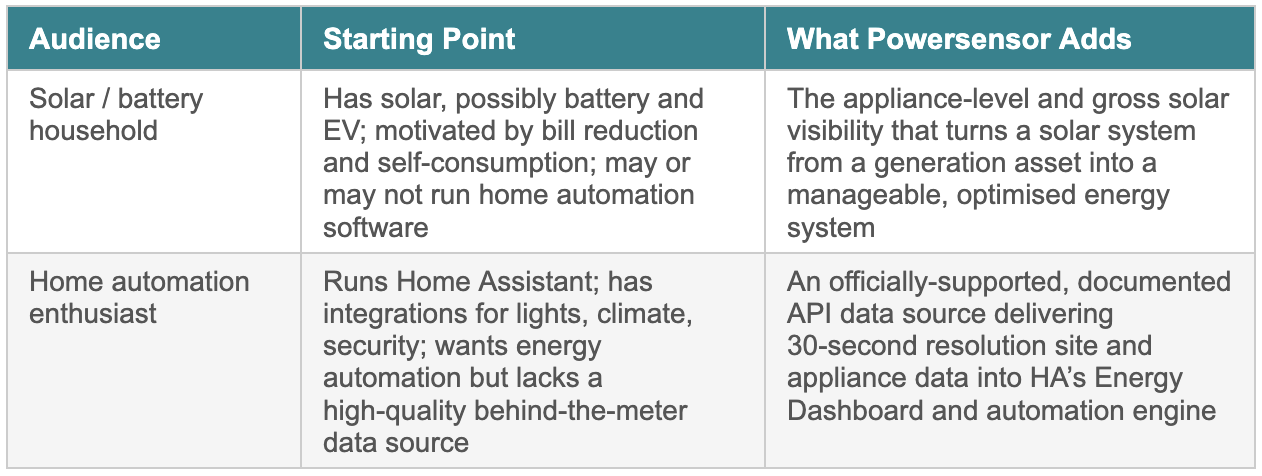
For the solar household, the entry point is the Powersensor app, which provides immediate visibility into self-consumption, export, and appliance loads without any home automation platform at all. Integration with Home Assistant is the next step for those who want to automate decisions rather than just observe them.
For the Home Assistant enthusiast, the entry point is the integration itself. Adding Powersensor as an energy data source and immediately enriching the Energy Dashboard with sub-circuit data that no smart meter can provide.
2. What Powersensor Provides
2.1 The Data: Site, Solar, and Appliance Circuits
Powersensor is a clip-on current transformer (CT) array that installs in a standard Australian switchboard. No licensed electrician is required. The device captures three distinct data streams that together provide a complete picture of behind-the-meter energy flows:
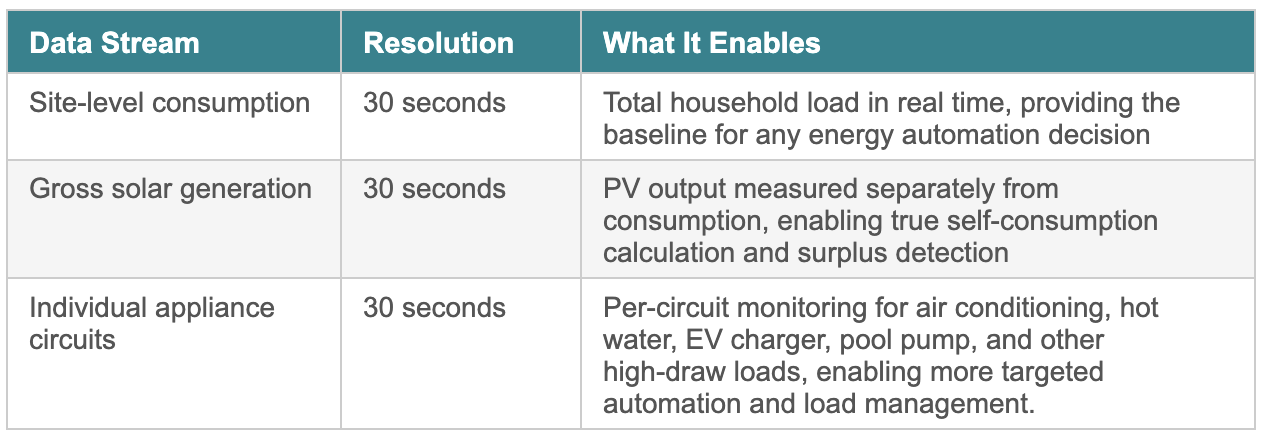
The combination of gross solar and individual circuit data is the key differentiator. Most energy monitors measure either the whole site or individual circuits, but not gross solar independently. Without gross solar generation as a separate data stream, a home automation system cannot calculate true surplus — only net import/export — which is insufficient for accurate diversion and optimisation decisions.
2.2 Powersensor vs. Your Battery's Own App
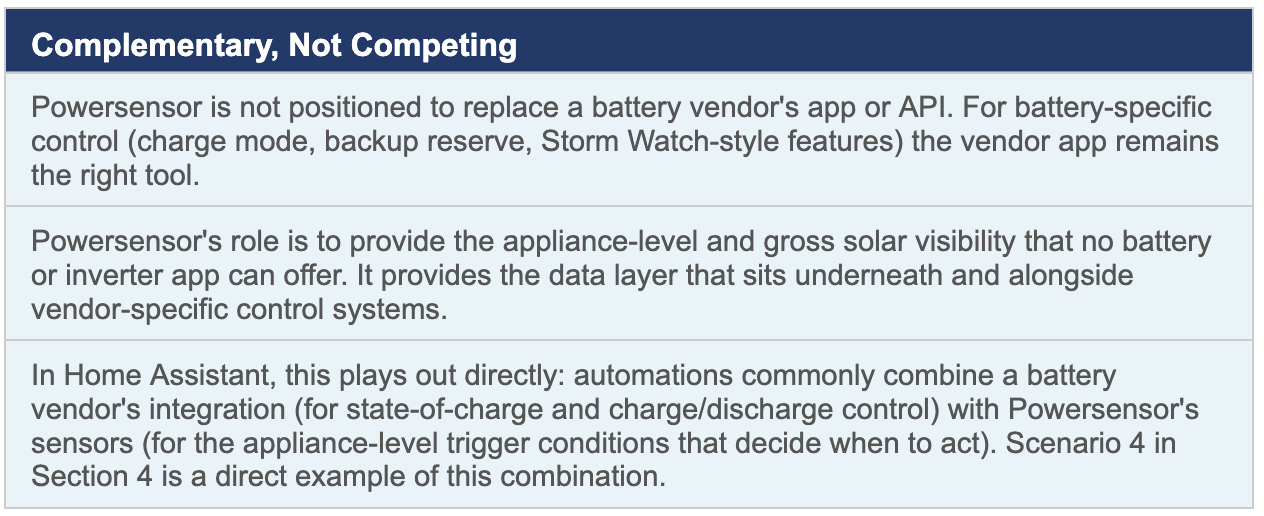
A natural question for any solar or battery household considering Powersensor: my battery already comes with an app and an API — Tesla, Sungrow, BYD, SolarEdge, and most other major brands all offer one. Why add another device and another data source on top of that?
The honest answer is that battery and inverter apps are built to monitor and control one thing: the battery (and sometimes the inverter) itself. They are not designed, and in most cases are not capable, of seeing what is happening at the individual appliance level elsewhere in the home. This is a structural limitation, not a missing feature that a future firmware update will add.
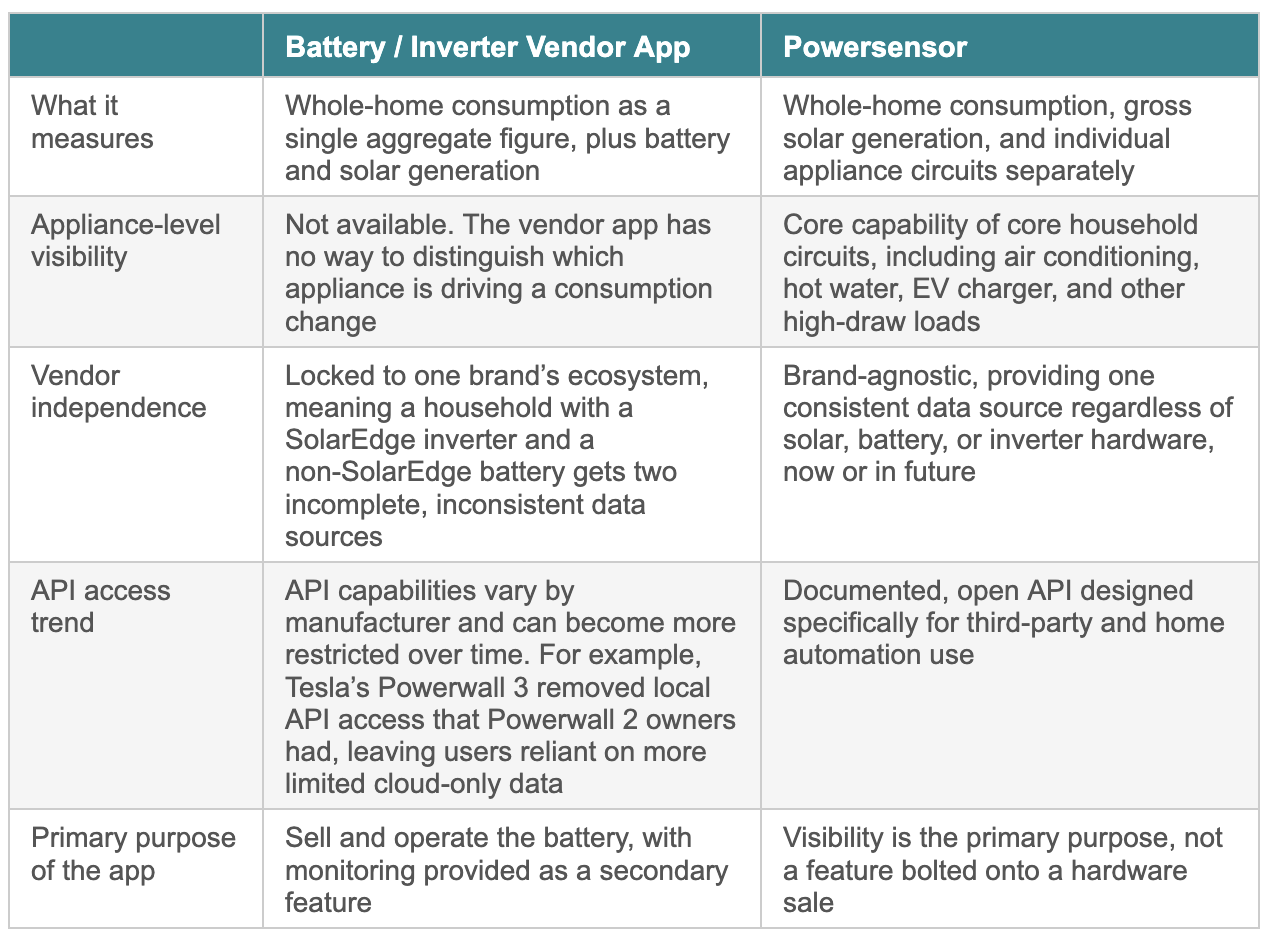
The clearest illustration of this gap is Tesla, the best-selling home battery brand in Australia. The Tesla app shows total home power usage as a single number; it cannot tell a homeowner whether a consumption spike was the oven, the air conditioner, or the EV charger. Even technically sophisticated owners who query Tesla’s API directly run into the same ceiling: the API returns total home load and battery state, not a circuit-level breakdown. This is not a criticism of Tesla’s product. The Powerwall is not designed to be an appliance monitor, and does an excellent job at what it is designed to do. It simply means that a battery app, however good, cannot answer the question Powersensor exists to answer.
2.3 Installation: DIY in Under 30 Minutes
Powersensor installs without a licensed electrician. Current transformer clamps attach directly to existing cables in the switchboard — no cutting, no rewiring. The device connects to the household Wi-Fi network and begins streaming data within minutes of installation.
For the home automation enthusiast, this means:
- No installation scheduling, no tradesperson cost, no wait time
- The device is live and data is flowing before any HA integration is configured
- Circuit labelling is done in the Powersensor app, where each monitored circuit is given an appliance name and type, making entities meaningful from the moment they appear in Home Assistant
2.4 Customer-Supplied Context from the App
At setup, the Powersensor app prompts the user to label each monitored circuit with the appliance type and where known the make and model, and captures the property location via the phone’s GPS. This app-collected context arrives alongside sensor data and becomes part of what is available to Home Assistant — named entities (e.g. ‘Daikin ducted A/C’, ‘Rheem hot water’) rather than anonymous circuit numbers.
2.5 Home Assistant Integration
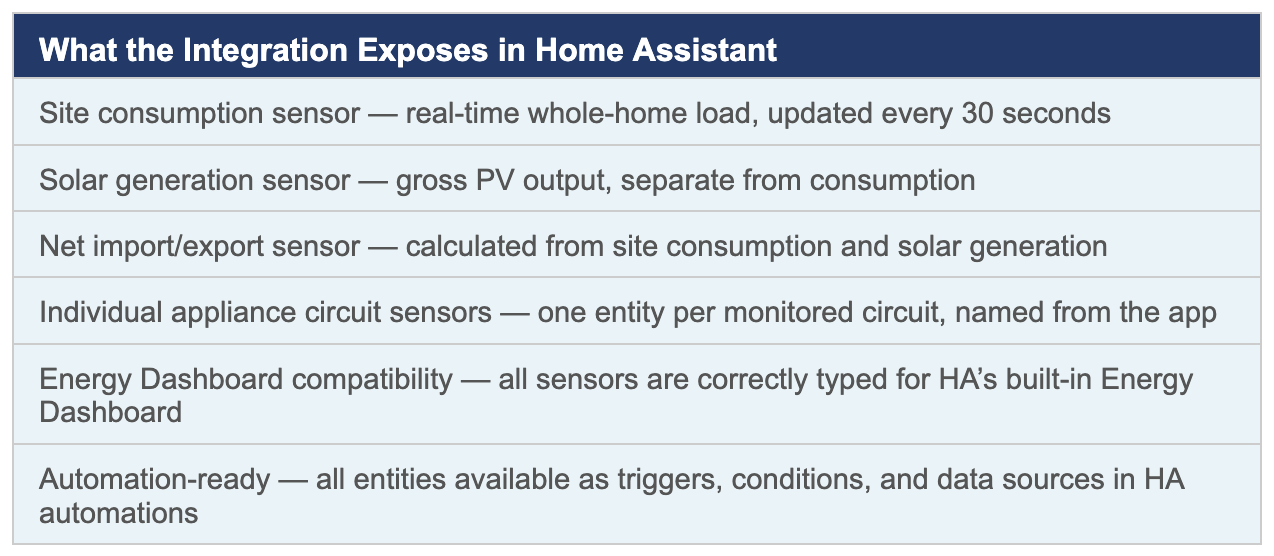
Powersensor has an official integration available today through the Home Assistant Community Store (HACS), with a native core Home Assistant integration in active development. The integration is built on Powersensor’s documented API and exposes the full suite of sensor data as Home Assistant entities.
3. Use Cases: Solar and Battery Households
The Powersensor App as the Starting Point
For solar and battery households who are not running home automation software, the Powersensor app alone delivers immediate value. It provides real-time visibility into solar generation, self-consumption, export, and individual appliance loads through an accessible dashboard without any technical setup beyond the device installation.
Common insights surfaced by the app that are not available from an inverter app or smart meter portal alone:
- True solar self-consumption ratio — what proportion of generation is actually used in the home versus exported
- Which specific appliances are running during solar generation peaks — enabling the household to manually shift loads to maximise self-use
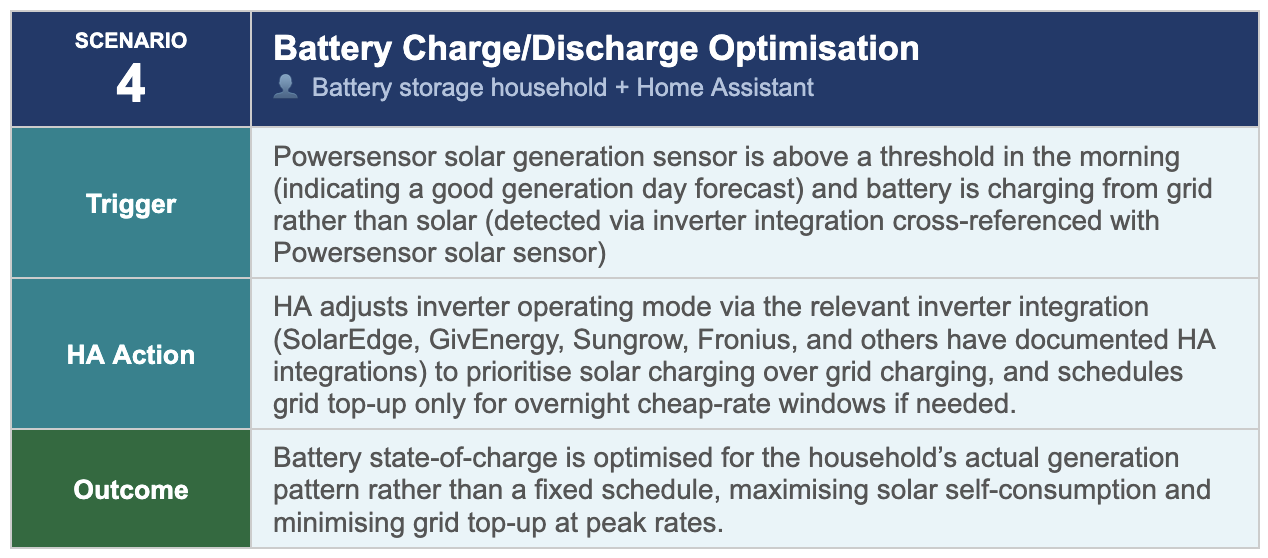
- Whether the battery is charging from solar or from grid and at what rate
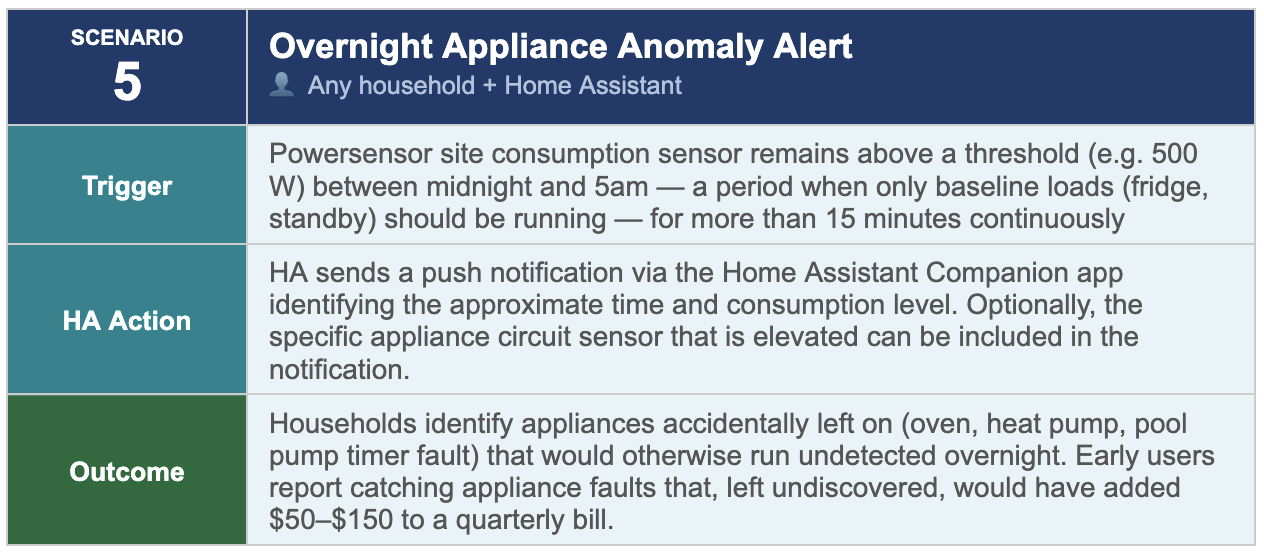
- Overnight consumption breakdown — identifying loads that are unexpectedly running outside of generation hours
- Appliance fault detection — unusual or sustained loads that may indicate a faulty device or an appliance left running
3.1 Solar Self-Consumption Optimisation
The primary financial goal for most solar households is to maximise self-consumption: using as much of their own generated electricity as possible rather than exporting it to the grid at a feed-in tariff rate that is almost always lower than the retail import rate. Powersensor provides the data visibility that turns this aspiration into a concrete, measurable outcome.
With gross solar generation measured separately from consumption, the Powersensor app (and HA integration for those using it) can calculate the real self-consumption ratio in real time and identify the specific household behaviours and load patterns that are limiting it. This is the data that answers the question most solar households cannot answer from their inverter app alone: not ‘how much did we generate?’ but ‘how much of what we generated did we actually use, and which loads consumed it?’
3.2 Tariff and Export Rate Awareness
For households on time-of-use tariffs or with variable feed-in rates, Powersensor’s appliance-level data adds a dimension that inverter data cannot. It shows which specific loads are running during high-cost import periods and helps verify whether load-shifting actions (running the dishwasher earlier, pre-cooling the house before peak) are actually reducing the household’s exposure to peak tariff periods.
This is particularly relevant as Australian households increasingly move from flat to time-of-use tariffs — a trend the AER expects to accelerate with smart meter rollout. A household that can see its actual appliance-level consumption in real time is far better positioned to make informed decisions about tariff selection and load timing than one relying on 30-minute interval data after the fact.
4. Use Cases: Home Assistant Automations
Powersensor as the Energy Data Foundation for HA
For Home Assistant users, Powersensor’s role is specific and important. It provides the 30-second, appliance-level, behind-the-meter energy data that no other commonly available integration offers, including gross solar generation, through properly typed HA entities.
The five automation scenarios below represent real-world deployments used by the HA community. Each uses Powersensor sensor entities as triggers or conditions, feeding into automations that control other devices in the home, including EV chargers, hot water systems, battery inverters, smart plugs, and climate systems. Powersensor provides the data, while Home Assistant’s automation engine provides the control.
5. Integration Architecture
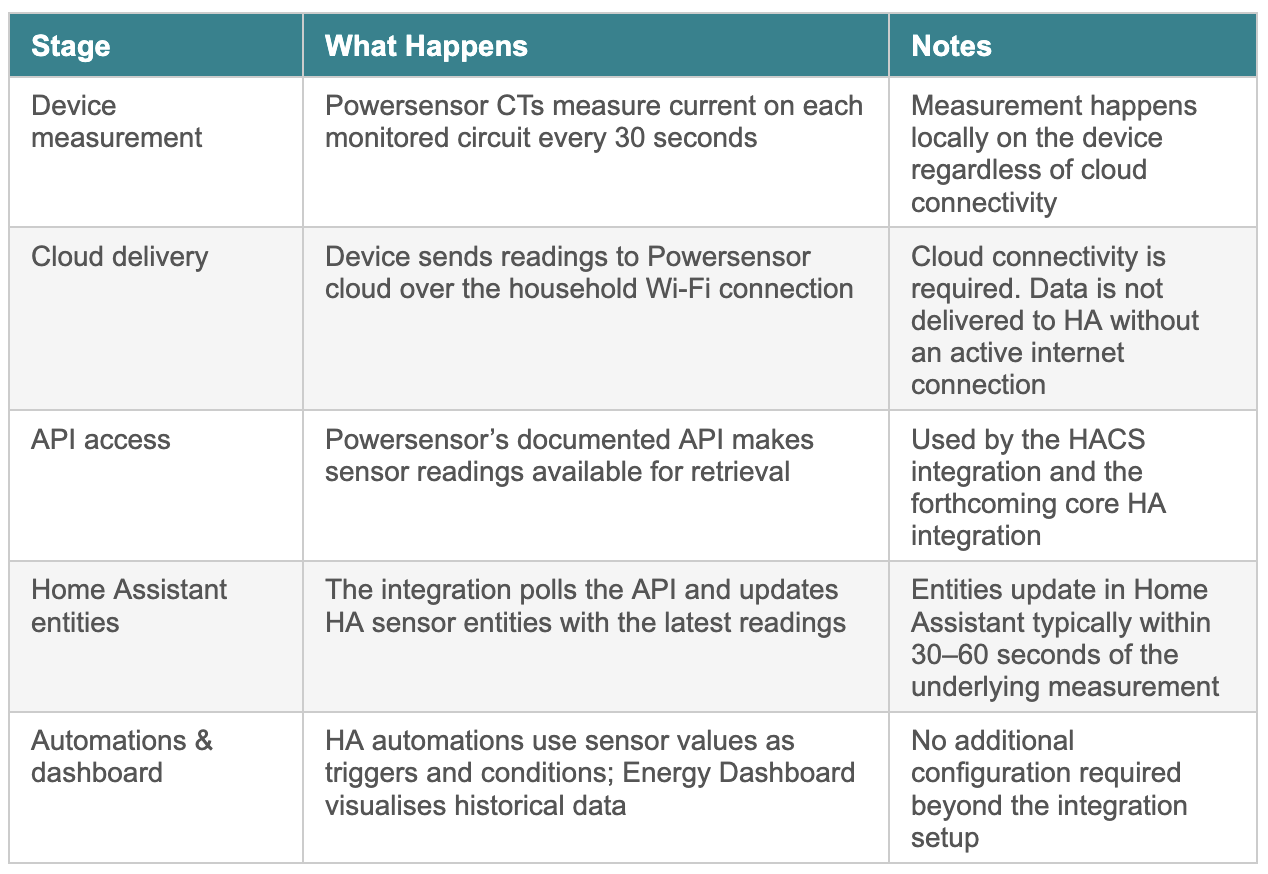
5.1 How Data Flows from Powersensor to Home Assistant
Understanding the data flow helps Home Assistant users plan their integration and set appropriate expectations about latency and dependencies.
5.2 HACS Installation
The Powersensor HACS integration is installed through the standard HACS workflow in Home Assistant. Users who have HACS installed can add Powersensor by searching the HACS integration library. Full installation instructions are available in the Powersensor documentation.
5.3 Cybersecurity and Data Privacy
As of 4 March 2026, Australia’s mandatory Cyber Security (Security Standards for Smart Devices) Rules 2025 came into effect, introducing binding security standards for consumer IoT devices including no universal default passwords, mandatory vulnerability disclosure processes, and minimum security update periods.
For Powersensor users, the relevant considerations are:
- Data in transit — sensor data travels from the device to the Powersensor cloud and from the cloud to Home Assistant via the documented API. Users should confirm their network uses WPA2 or WPA3 encryption.
- Data at rest — Powersensor cloud stores historical sensor data. Users should review the Powersensor privacy policy for data retention and sharing terms before installation.
- Appliance-level data sensitivity — 30-second appliance data reveals detailed patterns about household occupancy and behaviour. This data is more sensitive than whole-home interval data, and users should consider this when deciding which circuits to monitor.
- Home Assistant security — exposing any home automation platform to the internet via remote access (Nabu Casa, reverse proxy, etc.) introduces additional security considerations independent of Powersensor.
Powersensor’s compliance with the new mandatory standards should be verified directly with the manufacturer prior to purchase, particularly for devices manufactured on or after 4 March 2026.
6. Capability Summary
7. Getting Started
For Solar and Battery Households
- Purchase a Powersensor device from powersensor.com.au or authorised retail stockists
- Install the current transformer clamps in your switchboard following the in-app installation guide.No electrician required
- Label your circuits in the Powersensor app and begin monitoring your solar self-consumption, appliance loads, and export in real time
- When ready to automate: add the HACS integration to your Home Assistant instance and begin building energy automations using the scenarios in Section 4 as a starting point
For Home Assistant Enthusiasts
- Install HACS in Home Assistant if not already present (hacs.xyz)
- Search for ‘Powersensor’ in the HACS integration library and follow the installation instructions
- Configure the integration with your Powersensor API credentials from the Powersensor app
- Add Powersensor sensors to the HA Energy Dashboard for immediate visualisation of site, solar, and circuit data
- Begin building automations using the sensor entities as triggers and conditions — the five scenarios in Section 4 are directly implementable